
↓ Live Classes ↓
Class Quick Links
Member Class Access Links
-
1st Wednesday
8:00 AM - Eastern
No registration needed
Click on button below up to 10 min before class time -
2nd Wednesday
7:00 PM - Eastern
No registration needed
Click on button below up to 10 min before class time -
3rd Wednesday
8:00 AM - Eastern
No registration needed
Click on button below up to 10 min before class time -
4th Wednesday
7:00 PM - Eastern
No registration needed
Click on button below up to 10 min before class time -
5th Wednesday
11:00 AM - Eastern
No registration needed Click on button below up to 10 min before class time
Time Zone Calculator
This time zone calculator will automatically let you know the time difference without having to enter any locations or time zone abbreviations. Please let me know how this works for you. EMAIL
Be Aware of Time Zone Gaps:
USA & Canada: DST begins March 8, 2026, and ends November 1, 2026. (Arizona and Hawaii do not change).
European Union: DST starts March 29, 2026, and ends October 25, 2026.
Australia & New Zealand: DST begins in early October and ends late March/early April (opposite to the Northern Hemisphere).
Non-Observers: Most nations in Asia, Africa, and parts of South America do not change their clocks.
Class Days and Times
-
1st Wednesday
8:00 AM - Eastern Time Zone
Members-Only - JOIN CLASS -
2nd Wednesday
7:00 PM - Eastern Time Zone
Members-Only - JOIN CLASS -
2nd Saturday
11:00 AM - Eastern Time Zone
DROP-IN - Members Need to Register -
3rd Wednesday
8:00 AM - Eastern Time Zone
Members-Only - JOIN CLASS -
4th Wednesday
7:00 PM - Eastern Time Zone
Members-Only - JOIN CLASS -
5th Wednesday
11:00 am - Eastern Time Zone
Members Only - JOIN CLASS
Class Calendar

Class Date List
Drop-In Class Registration
Drop-In classes are held on the 2nd Saturday at 11:00 am ET to offer non-members an opportunity to attend.
HOW MEMBERS REGISTER FOR FREE
Current members have access to all Drop-In classes as a member benefit and can register for each Drop-In class below. You do not need to enter your credit card information or pay to register. Copy the coupon code PUBLICACCESS and during the checkout process in section that says “Package, gift, or coupon code” click the + sign and paste your coupon code. See image below:
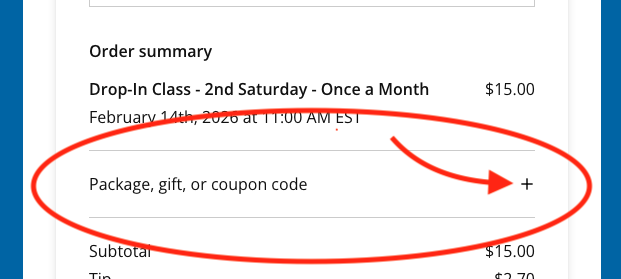
You will see that this process offers you the ability as a member to register for free. Please complete the registration process until the confirmation screen appears. You should recieve a confirmation email. The place for you to register is just below.
DROP-IN CLASS REGISTRATION
How to locate your scheduled sessions
If you forget when your previously scheduled session is you can always search your email service by using this e-mail address:
scheduling@squarespacescheduling.com
Need Help Registering?
Class registration instructions can be accessed by clicking this button

BRIDGE CLASS
When your member Live Classes are cancelled due to unforeseen circumstances, you can access and take a limited release class for 24 hours by clicking the button below.
* A class will be posted here if a Live Class was recently cancelled
If you have any questions please Contact Me
Live Class Information
-
Who - Members-only
What - Live group online classes
Where - Zoom (your links are listed below)
When - During the scheduled class days and times listed above
How - Once you register for a community event you will get your access link:
Immediately on the confirmation screen after you register.
Immediately in a confirmation email to the email address, you provided
24 hours before the event in a reminder email to the email address, you provided
A few hours before in a reminder text to the phone number you provided
Access - Between five to ten minutes before, and on time for your scheduled class
More Info - Use the Class Information section menu
-
Beginners Guide - to using Zoom Getting Started
Support - Use Zooms support to troubleshoot issues you may be having. Troubleshooting Zoom Meetings
Camera and Microphone - Test your camera and microphone before class.
If you have a zoom account you can test them here Join a Test Meeting
Internet Browser - Use an updated browser, preferably (as of 2022)
Chromium Edge 80 or higher
Google Chrome 53.0.2785 or higher
Safari 10.0.602.1.50 or higher
Firefox 76 or higher
Internet Explorer 10 or higher
Camera and mic:
Check that your internet browser has access to your camera and/or mic
Use https:// - The app cannot access the user’s camera or mic if the user is viewing the page via a http:// link
Internet:
Connect to a stable internet signal preferably through an ethernet cable, especially if you are using an older device.
Test your internet connection speed before class starts Speed Test
-
Members-only
Group events
Online
Weekly
Guided movements
All levels of students are welcome
Add variety to your daily practice
Connect with the Your Muscle Whisperer community
Access anywhere you are
-
Age:
13 years of age or older.
If a student is younger than 18 they will need a parent or legal guardian to attend class with them
Students younger than 13 will need to schedule One-on-One Session(s) with their parent or guardian present
Ability Level:
You need the ability to do gentle self-regulated movement or exercise.
If you are unsure if you can do gentle movements, get permission from your physician
You will need to be able to lay down or sit in a chair
Experience:
No prior experience is necessary: you will be learning as you go
Disclaimer:
Review my disclaimer before you attend class
-
Membership - You must be a current member
Access - Members-only
Links - Once you register for a class you will get your access link:
Immediately on the confirmation screen after you register.
Immediately in a confirmation email to the email address, you provided
24 hours before the event in a reminder email to the email address, you provided
A few hours before in a reminder text to the phone number you provided
Internet
Wifi
Wired
Device
Cell phone, tablet, or computer with a camera and internet connectivity.
To watch the live feed you will need Audio and video tech on your device.
-
When classes scheduled and published
Some events are regularly scheduled
Some events will be announced and only happen occasionally or once
-
Your Link - Once you register for a community event you will get your access link:
Immediately on the confirmation screen after you register.
Immediately in a confirmation email to the email address, you provided
24 hours before the event in a reminder email to the email address, you provided
A few hours before in a reminder text to the phone number you provided
Device - Make sure you have a device that has internet access.
When - Your can access your community event 5-10 minutes before the scheduled start time.
Access - to the classroom will open between five minutes and the starting time for your class.
Waiting Room - You will be placed in the waiting room until class starts. Be aware that you may receive messages from Ryan while you are waiting.
-
Schedule - your One-on-One session by:
Logging into your Member account
Go to the Live Classes members’ page
Go to the Register section of the Live Classes
Register for your class
Copy and save your Zoom link. (You will receive your unique Zoom link on the confirmation screen, in emails, and in a text to your phone)
Read - the Comfort and Principles page.
Prepare - Find a clean floor space with enough room to make a snow-angel. Clear away all distractions, objects, animals, and notify people in your space you will be taking a class.
Gather - a variety of supports and have them in reach (Towels, pillows, blanket, chair, etc…)
Clothing - Wear clothing that does not bind or constrict your movement.
Temperature - Keep your space warm or cool enough to be comfortable.
Read - my Disclaimer before beginning class.
Enjoy - your guided movement classes and learn to feel better every day.
-
Not all my classes are posted, but you can access many of my recorded content in the DIY Library anywhere, anytime.

